Unity中流场寻路的实现

引入

流场寻路是一种基于向量场寻路的群体寻路算法。通过在网格中计算向量场,单位根据脚下向量场的方向移动即可渐渐向目标移动。因为所有要移动的单位共享一个向量场,计算一次就可以给所以单位导航,实现了群体寻路的低开销。
可以想象一个高低不同的沙盘,往盘中到水产生了流动(向量场),沙盘上棋子自然会向底处(目标)流去。

构建数据结构

先使用二维数组构建一个网格数据结构。要包含以下数据:

  1. 表示该网格是否可以通行(该项目中只有障碍物情况)。
  2. 该网格到目标的最短路径代价,不可通行设置为MAX值。
  3. 该网格包含的向量,指向代价最小的邻接位置。
 1
 2
 3
 4
 5
 6
 7
 8
 9
10
11
12
13
//使用ScriptableObject以在编辑器下预计算并保存障碍数据
public class FieldGridSO : ScriptableObject
{
   public Vector2Int GridSize = new Vector2Int(150, 100);
   public float CellSize = 1f;
   public Vector2 origin = Vector2.zero;//网格原点
   
   private bool[,] _obstacleField;
   private int[,] _costField;
   private Vector2[,] _flowField;

   //TODO
}

标记障碍数据

可以使用unity的Physics.CheckBox检测是否和场景中物体有碰撞。最直接的方式是逐个网格检查后在obstacleField中标记。但是这样在100x100网格下就要做1万次检测了,静态场景无所谓,但是当场景会变化,要更新障碍信息时会非常消耗时间。
可以采用类似四叉树检测的方式,先在整个网格区域进行检查,没有碰撞全部标记为无障碍完成计算,有碰撞就将网格四等分,然后在每个等分的网格递归上述步骤,直到最终划分的网格小于等于每个网格的尺寸CellSize
以下为具体实现:

 1
 2
 3
 4
 5
 6
 7
 8
 9
10
11
12
13
14
15
16
17
18
19
20
21
22
23
24
25
26
27
28
29
30
31
32
33
34
35
36
37
38
39
40
41
42
43
44
45
46
47
48
49
50
51
52
53
54
55
56
57
58
59
60
61
62
63
64
65
66
67
68
69
70
71
72
73
74
75
76
77
78
79
80
81
82
83
84
85
86
87
88
89
//......续之前代码

//使用栈数据结构防止栈溢出。
//存储参数数据。
struct BakeObstacleFieldArgs
{
    public Vector2 center;
    public Vector2 halfSize;

    public BakeObstacleFieldArgs(Vector2 center, Vector2 halfSize)
    {
        this.center = center;
        this.halfSize = halfSize;
    }
}
private void BakeObstacleField(Vector2 center, Vector2 halfSize, string obstacleMask)
{
    //用于记录时间。
    Stopwatch sw = new Stopwatch();
    sw.Start();

     if (_obstacleField == null)
      {
         _obstacleField = new bool[GridSize.x, GridSize.y];
      }
      else
      {
         Array.Clear(_obstacleField, 0, _obstacleField.Length);
      }

    Stack<BakeObstacleFieldArgs> _argsStack = new Stack<BakeObstacleFieldArgs>();
    BakeObstacleFieldArgs args = new BakeObstacleFieldArgs(center, halfSize);
    
    _argsStack.Push(args);

    while (_argsStack.Count > 0)
    {
        args = _argsStack.Pop();
        
        bool isHit = Physics.CheckBox(
        new Vector3(args.center.x, args.center.y, 0f),
        new Vector3(args.halfSize.x, args.halfSize.y, 1f),
        quaternion.identity,
        1 << LayerMask.NameToLayer(obstacleMask)
        );

        //没有碰撞情况下,退出
        if (!isHit)
        {
            continue;
        }
        
        //划分大小小于等于CellSize情况下,退出
        if (args.halfSize.x <= CellSize * 0.5f && args.halfSize.y <= CellSize * 0.5f)
        {
            //计算对应数组位置
            Vector2Int intPos = Vector2Int.zero;
            int x = (int)Math.Floor((args.center.x - origin.x) / CellSize);
            int y = (int)Math.Floor((args.center.y - origin.y) / CellSize);
            if (x >= 0 && x < GridSize.x && y >= 0 && y < GridSize.y)
            {
                intPos = new Vector2Int(x, y);
                _obstacleField[intPos.x, intPos.y] = true;
            }
            continue;
        }
        
        //划分空间
        Vector2 newHalfSize = new Vector2(0.5f * args.halfSize.x, 0.5f * args.halfSize.y);
        Vector2[] newCenters = {
        new Vector2(args.center.x - newHalfSize.x, args.center.y - newHalfSize.y),
        new Vector2(args.center.x + newHalfSize.x, args.center.y + newHalfSize.y),
        
        new Vector2(args.center.x - newHalfSize.x, args.center.y + newHalfSize.y),
        new Vector2(args.center.x + newHalfSize.x, args.center.y - newHalfSize.y),
        };

        foreach (var newCenter in newCenters)
        {
            //入栈
            BakeObstacleFieldArgs newArgs = new BakeObstacleFieldArgs(newCenter, newHalfSize);
            _argsStack.Push(newArgs);
        }
        
    }

    sw.Stop();
    Debug.Log(sw.ElapsedMilliseconds + "ms");
}

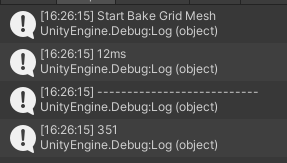
我又另外写了个直接逐网格检测的函数就行对比。
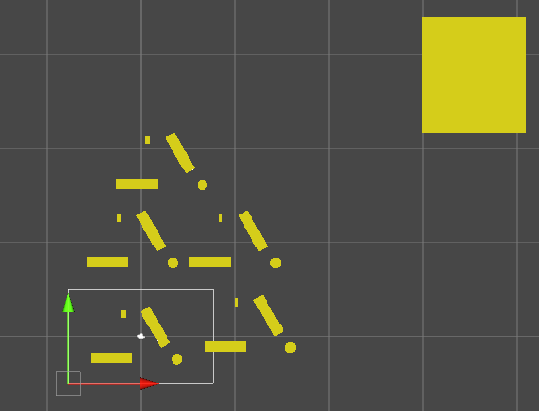
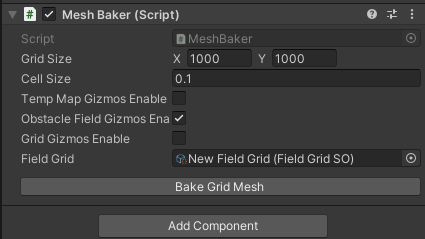
alt text
alt text
alt text
可以看到,在1000x1000网格下,直接检测花了351ms,而四叉树优化版本花了12ms。提升了将近96.6%。

计算代价图

接下来要计算每个网格到目标的代价。可以从目标点开始,使用BFS广度优先遍历张网格。目标点代价为0,接下来访问其邻接节点,代价为之前访问的节点代价加1,整个网格遍历完成后即完成代价图的计算。
以下是实现:

 1
 2
 3
 4
 5
 6
 7
 8
 9
10
11
12
13
14
15
16
17
18
19
20
21
22
23
24
25
26
27
28
29
30
31
32
33
34
35
36
37
38
39
40
41
42
43
44
45
46
47
48
49
50
51
52
53
54
55
56
//......续之前代码

private void CalculateCostField(Vector2Int target)
{
    if (_costField == null)
    {
        _costField = new int[GridSize.x, GridSize.y];
    }
    
    bool[,] isVisited = new bool[GridSize.x, GridSize.y];

    Vector2Int[] dirs = {
        new Vector2Int(0, -1),  // up
        new Vector2Int(0, 1),   // down
        new Vector2Int(-1, 0),  // left
        new Vector2Int(1, 0),   // right
        new Vector2Int(1, 1),
        new Vector2Int(-1, 1),
        new Vector2Int(-1, -1),
        new Vector2Int(1, -1)
    };
    
    Queue<int[]> queue = new Queue<int[]>();
    queue.Enqueue(new[] { target.x, target.y , 0});
    isVisited[target.x, target.y] = true;
    while (queue.Count != 0)
    {
        Int32[] current = queue.Dequeue();
        
        int x = current[0];
        int y = current[1];
        int lCost = current[2];
        
        _costField[x, y] = lCost;

        foreach (var dir in dirs)
        {
        int x1 = x + dir.x;
        int y1 = y + dir.y;
        if (x1 < GridSize.x && x1 >= 0 && y1 < GridSize.y && y1 >= 0 &&
            isVisited[x1, y1] == false)
        {
            isVisited[x1, y1] = true;

            if (_obstacleField[x1, y1] == true)
            {
                queue.Enqueue(new[] { x1, y1, int.MaxValue});
            }
            else
            {
                queue.Enqueue(new[] { x1, y1, lCost + 1});
            }
        }
        }
    }
}

因为只是涉及数组访问和数值计算,速度还是挺快,这里先不考虑优化。

计算向量图

向量场的计算非常简单,只要遍历所有网格,找到网格周围代价最小的邻接网格,再计算指向它的单位向量即可。

 1
 2
 3
 4
 5
 6
 7
 8
 9
10
11
12
13
14
15
16
17
18
19
20
21
22
23
24
25
26
27
28
29
30
31
32
33
34
35
36
37
38
39
40
41
42
43
44
45
46
//......续之前代码
private void CalculateFlowField()
   {
      Stopwatch ss = new Stopwatch();
      ss.Start();
      _flowField = new Vector2[GridSize.x, GridSize.y];
      
      Vector2Int[] dirs = {
         new Vector2Int(0, -1),//up
         new Vector2Int(0, 1),// down
         new Vector2Int(-1, 0),
         new Vector2Int(1, 0),
         new Vector2Int(1, 1),
         new Vector2Int(-1, 1),
         new Vector2Int(-1, -1),
         new Vector2Int(1, -1),
      };
      ss.Stop();
      Debug.Log(ss.ElapsedMilliseconds + "ms. 初始化数组");
      
      ss.Restart();
      for (int x = 0; x < GridSize.x; x++)
      {
         for (int y = 0; y < GridSize.y; y++)
         {
            int minCostMove = int.MaxValue;
            Vector2 minDir = new Vector2(x, y);
            foreach (var dir in dirs)
            {
               int ix = x + dir.x;
               int iy = y + dir.y;
               if (ix >= 0 && ix < GridSize.x && iy >= 0 && iy < GridSize.y && _obstacleField[ix, iy] == false)
               {
                  if (_costField[ix, iy] < minCostMove)
                  {
                     minCostMove = _costField[ix, iy];
                     minDir = dir;
                  }
               }
            }
            _flowField[x, y] = minDir.normalized;
         }
      }
      ss.Stop();
      Debug.Log(ss.ElapsedMilliseconds + "ms. 计算数据");
   }

管理器

接下来,简单编写一个unity组件,用于管理该数据。它应该存储一个向量图的引用,负责其初始化,设置向量图目标以开始计算。
先在FieldGridSO添加相关函数并暴露。

 1
 2
 3
 4
 5
 6
 7
 8
 9
10
11
12
13
14
15
16
17
18
19
20
21
22
23
24
25
26
27
28
29
30
31
32
33
34
35
36
37
38
39
40
41
42
43
44
45
46
47
48
49
50
51
52
53
54
55
56
57
public void SetTarget(Vector2 target)
{
    Stopwatch sw = new Stopwatch();
    sw.Start();
    Vector2Int intTarget = Vector2Int.zero;
    int x = (int)Math.Floor((target.x - origin.x) / CellSize);
    int y = (int)Math.Floor((target.y - origin.y) / CellSize);
    if (x >= 0 && x < GridSize.x && y >= 0 && y < GridSize.y)
    {
        intTarget = new Vector2Int(x, y);
    }
    CalculateCostField(intTarget);
    CalculateFlowField();

    sw.Stop();
    Debug.Log(sw.ElapsedMilliseconds + " ms");
}

public Vector2 GetFlowFieldVector(Vector2 pos)
{
    if (_costField == null || _flowField == null)
    {
        return Vector2Int.zero;
    }
    
    Vector2Int intPos = Vector2Int.zero;
    int x = (int)Math.Floor((pos.x - origin.x) / CellSize);
    int y = (int)Math.Floor((pos.y - origin.y) / CellSize);
    if (x >= 0 && x < GridSize.x && y >= 0 && y < GridSize.y)
    {
        intPos = new Vector2Int(x, y);
        return _flowField[intPos.x, intPos.y];
    }
    else
    {
        Vector2Int flowdir = Vector2Int.zero;
        if (x < 0)
        {
        flowdir.x = 1;
        }
        else if (x > GridSize.x)
        {
        flowdir.x = -1;
        }

        if (y < 0)
        {
        flowdir.y = 1;
        }
        else if (y > GridSize.y)
        {
        flowdir.y = -1;
        }
        
        return flowdir;
    }
}

然后是管理器类。

 1
 2
 3
 4
 5
 6
 7
 8
 9
10
11
12
13
14
15
16
17
18
19
20
21
22
23
24
25
26
27
28
29
30
31
32
33
34
35
36
37
38
39
40
41
42
43
44
45
46
47
48
public class MeshBaker : MonoBehaviour
{
    public Vector2Int GridSize = new Vector2Int(100, 100);
    public float CellSize = 0.5f;
    
    public bool TempMapGizmosEnable = true;
    public bool ObstacleFieldGizmosEnable = true;
    public bool GridGizmosEnable = true;

    public FieldGridSO _fieldGrid;

    void Update()
    {
        if (Input.GetMouseButtonDown(0))
        {
            Vector2 mousePos = Input.mousePosition;
            Vector3 worldPos = Camera.main.ScreenToWorldPoint(mousePos);
            if (_fieldGrid != null)
            {
                _fieldGrid.SetTarget(worldPos);
            }
        }
    }

    public Vector2 FindDir(Vector2 pos)
    {
        return _fieldGrid.GetFlowFieldVector(pos);
    }

    //可以绘制相关信息的函数
    private void OnDrawGizmos()
    {
        if (_fieldGrid != null && TempMapGizmosEnable)
        {
            _fieldGrid.DrawTempMapGizmos(transform.position);
        }

        if (_fieldGrid != null && ObstacleFieldGizmosEnable)
        {
            _fieldGrid.DrawObstacleFieldGizmos(transform.position);
        }

        if (GridGizmosEnable && _fieldGrid != null)
        {
            _fieldGrid.DrawGridGizmos(transform.position);
        }
    }
}

代理器

创建代理器代理单位的寻路。

 1
 2
 3
 4
 5
 6
 7
 8
 9
10
11
12
13
14
15
16
17
18
19
public class FieldGridAgent : MonoBehaviour
{
    public MeshBaker baker;
    private Rigidbody2D rb2d;

    private void Awake()
    {
        rb2d = GetComponent<Rigidbody2D>();
    }

    void Update()
    {
        if (baker != null)
        {
            Vector2 dir = baker.FindDir(transform.position);
            rb2d.velocity = dir * 0.5f;
        }
    }
}

相关优化

  1. 计算向量图可以使用unity job system进行优化多线程并行。
  2. 因为计算多多少少有点时间,可以使用异步等待计算完成而不必阻塞主线程。不过注意大部分unity的组件API的方法只能在主线程使用。所以使用了Physics.BoxCheck的BakeObstacleField无法在后台进行或者多线程。
    修改SetTarget为异步函数。
 1
 2
 3
 4
 5
 6
 7
 8
 9
10
11
12
13
14
15
16
17
18
19
20
21
public async void SetTarget(Vector2 target)
{
    Stopwatch sw = new Stopwatch();
    sw.Start();
    Vector2Int intTarget = Vector2Int.zero;
    int x = (int)Math.Floor((target.x - origin.x) / CellSize);
    int y = (int)Math.Floor((target.y - origin.y) / CellSize);
    if (x >= 0 && x < GridSize.x && y >= 0 && y < GridSize.y)
    {
        intTarget = new Vector2Int(x, y);
    }
    Action act = delegate {
    CalculateCostField(intTarget);
    CalculateFlowField();
    };

    await Task.run(act);

    sw.Stop();
    Debug.Log(sw.ElapsedMilliseconds + " ms");
}
  1. 路径优化。直接使用向量图中的方向移动单位,单位间还有行动简单,碰撞和移动不平滑等问题。
    1. 因为单位可能同时在不同格子上,所以可以对周围格子的向量进行插值来让移动更平滑一点。
     1
     2
     3
     4
     5
     6
     7
     8
     9
    10
    
    //修改获取向量的函数,用周围四格来插值
     int lx = intPos.x <= cellPos.x ? -1 : 1;
    int ly = intPos.y <= cellPos.y ? -1 : 1;
    float wx = (pos.x - cellPos.x) * 2/ CellSize;
    float wy = (pos.y - cellPos.y) * 2/ CellSize;
    Vector2 x1 = Vector2.Lerp(GetFlowField(intPos.x, intPos.y), GetFlowField(intPos.x + lx, intPos.y), wx);
    Vector2 x2 = Vector2.Lerp(GetFlowField(intPos.x, intPos.y + ly), GetFlowField(intPos.x + lx, intPos.y + ly), wx);
    //GetFlowField需要对越界进行处理,如返回回到网格的向量
    Vector2 res = Vector2.Lerp(x1, x2, wy);
    return res.normalized;
    
    1. Steering behavior。可以使用类似于Boid鸟群的思想。为壁障,避免单位碰撞分别计算一个力相加来完成这些行为。

github项目地址

Licensed under CC BY-NC-SA 4.0
使用 Hugo 构建
主题 StackJimmy 设计